Backend & integrations/Salesforce
Salesforce
This example runs from source. Open the repository to clone, build, and run it locally.
Open on GitHubBackend & integrations
Salesforce
Lightning Web Component that embeds a Gantt chart in Salesforce, backed by custom objects for tasks and links and an Apex data class.
- README.md
- gantt.js
- gantt.html
- GanttData.cls
README.md View on GitHub
# Gantt Demo for SalesForce
[](https://dhtmlx.com/)
Here you can find a code example of the Gantt chart for Lightning Web Components on Salesforce Platform.
The sample is implemented with the help of JavaScript Gantt chart library - [DHTMLX Gantt](https://dhtmlx.com/docs/products/dhtmlxGantt/).
[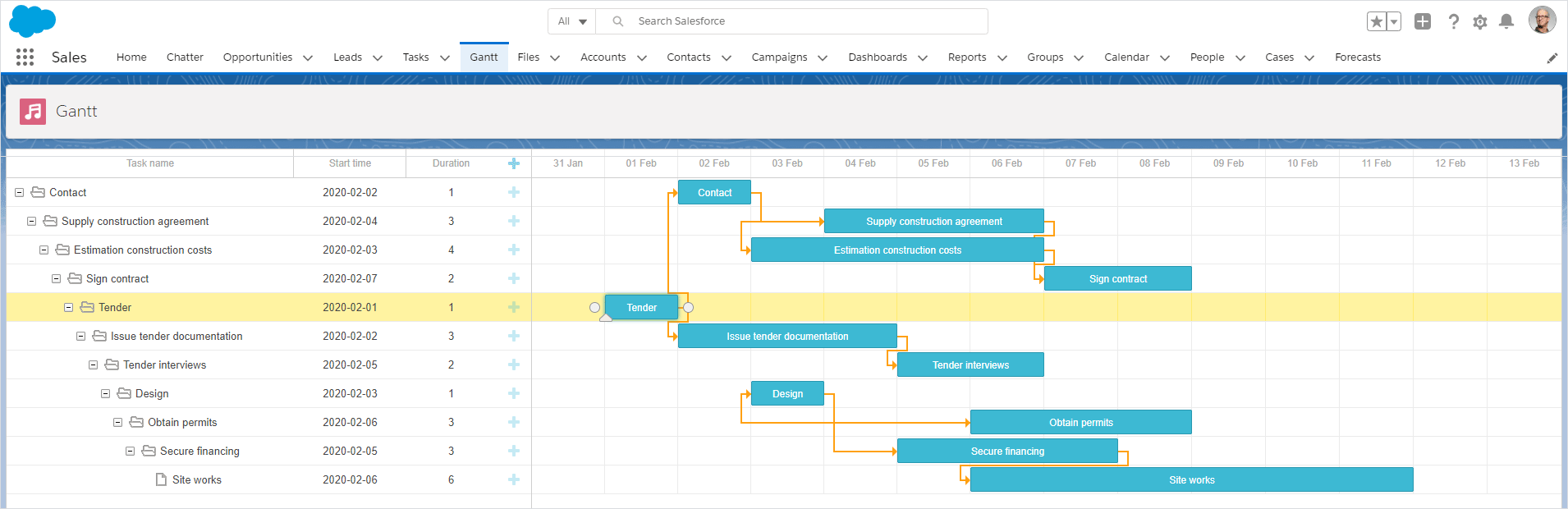](https://dhtmlx.com/docs/products/demoApps/salesforce-gantt-chart/)
## Prerequisites
- Enable the [Developer Hub](https://developer.salesforce.com/docs/atlas.en-us.sfdx_setup.meta/sfdx_setup/sfdx_setup_enable_devhub.htm) in your organization
- Install the [Salesforce CLI](https://developer.salesforce.com/tools/sfdxcli)
## How to start
- [Change login url](https://developer.salesforce.com/docs/atlas.en-us.sfdx_dev.meta/sfdx_dev/sfdx_dev_auth_web_flow.htm) (sfdcLoginUrl) in sfdx-project.json to url of your SalesForce organization
- Create [scratch org](https://developer.salesforce.com/docs/atlas.en-us.sfdx_dev.meta/sfdx_dev/sfdx_dev_scratch_orgs.htm#!)
```sh
sfdx org login web -d
sfdx org create scratch -f config/project-scratch-def.json -d
```
- Publish code
```sh
sfdx project deploy start
sfdx data import tree -f ./data/GanttTask__c.json
```
- Open scratch org in browser
```
sfdx org open
```
- Create custom tab with Gantt
The scratch org already has Gantt app which you can check, or go to "Setup : Lighting Apps", create a new Lighting App and drop the Gantt from the list of available components:
https://docs.dhtmlx.com/gantt/desktop__howtostart_salesforce.html#step7creatinglightningpage
- Open the tab with Gantt by choosing it from the `App Launcher`
## How to configure / modify
### Backend
getTasks in force-app/main/default/classes/GanttData.cls returns list of tasks and links, adjust this query as necessary.
### Frontend
force-app/main/default/lwc/gantt/gantt.js contains code of web component
```js
function unwrap(fromSF){
const data = fromSF.tasks.map(a => ({
```
**unwrap** functions controls how data from SalesForce is converted to Gantt compatible objects. You will need to modify this code if you will want to provide some additional data properties from SalesForce to the Gantt
```js
initializeUI(){
const root = this.template.querySelector('.thegantt');
root.style.height = this.height + "px";
const gantt = window.Gantt.getGanttInstance();
```
**initializeUI** creates an instance of gantt. This is the perfect place to configure gantt by using its [API](https://docs.dhtmlx.com/gantt)
```js
gantt.createDataProcessor({
task: {
```
**createDataProcessor** defines data saving rules, they need to be adjusted if you will want to save some extra fields along with the default Task's data.
### DHTMLX Gantt Version and License
The force-app/main/default/staticresources/dhtmlxgantt folder comes under the Evaluation license of DHTMLX Gantt. The Gantt chart will show a warning message about a 30-day trial period from time to time. For production usage, you will need to replace the js and css files in this archive with the ones from the DHTMLX Gantt package under the Enterprise or Ultimate licenses.
---
<p align="center">
🚀 <b>Explore the Live Demo Built with DHTMLX for Salesforce LWC</b>
</p>
<p align="center">
This demo presents a complete integration of DHTMLX components with Salesforce LWC, featuring a Kanban board for intuitive drag-and-drop task organization, a Gantt chart for advanced project management with task dependencies, and a Scheduler for managing events. <a href="https://github.com/DHTMLX/salesforce-lwc-demo/">Check demo on GitHub</a>.
</p>
<p align="center">
You can test the demo in a live Salesforce environment without any local setup. Make sure you use the following credentials:
</p>
<p align="center">Login: <code>user</code></p>
<p align="center">Password: <code>demo</code></p>
<p align="center">
<a href="https://dhtmlx-dev-ed.develop.lightning.force.com/lightning/n/Kanban">
Open the live demo >>> </a>
</p>
---
## Related resources
- [DHTMLX Gantt documentation](https://docs.dhtmlx.com/gantt/)
- [About DHTMLX Gantt](https://dhtmlx.com/docs/products/dhtmlxGantt/)
- [Video tutorial](https://youtu.be/1nXl9jfMdto?list=PLKS_XdyIGP4MEW6yvvQUZT8vJKHVOq2S0)
- [About DHTMLX Gantt in Salesforce](https://dhtmlx.com/docs/products/demoApps/salesforce-gantt-chart/)
- [Demo of DHTMLX Gantt chart with resource management diagram for SalesForce LWC](https://github.com/DHTMLX/salesforce-gantt-resources-demo)
## Join our online community
- Star our GitHub repo :star:
- Check our [roadmap](https://trello.com/b/fhOySHPj/gantt-roadmap) for future updates :wrench:
- Watch our tutorials on [YouTube](https://www.youtube.com/user/dhtmlx/videos) :tv:
- Read us on [Medium](https://dhtmlx.medium.com) :newspaper:
- Follow us on [X](https://x.com/dhtmlx) :bird:
- Check our news and updates on [Facebook](https://www.facebook.com/dhtmlx/) :feet:
force-app/main/default/lwc/gantt/gantt.js View on GitHub
/* eslint-disable guard-for-in */
/* eslint-disable no-undef */
import { LightningElement, api } from "lwc";
import { ShowToastEvent } from "lightning/platformShowToastEvent";
import { loadStyle, loadScript } from "lightning/platformResourceLoader";
import { createRecord, updateRecord, deleteRecord } from "lightning/uiRecordApi";

// Static resources
import GanttFiles from "@salesforce/resourceUrl/dhtmlxgantt";

// Controllers
import getTasks from "@salesforce/apex/GanttData.getTasks";

function unwrap(fromSF) {
    const data = fromSF.tasks.map((a) => ({
        id: a.Id,
        text: a.Name,
        start_date: a.Start_Date__c,
        duration: a.Duration__c,
        parent: a.Parent__c,
        progress: a.Progress__c,
        type: a.Task_Type__c,
    }));
    const links = fromSF.links.map((a) => ({
        id: a.Id,
        source: a.Source__c,
        target: a.Target__c,
        type: a.Type__c
    }));
    return { data, links};
}

export default class GanttView extends LightningElement {
    static delegatesFocus = true;

    @api height;
    ganttInitialized = false;

    renderedCallback() {
        if (this.ganttInitialized) {
            return;
        }
        this.ganttInitialized = true;

        Promise.all([
            loadScript(this, GanttFiles + "/dhtmlxgantt.js"),
            loadStyle(this, GanttFiles + "/dhtmlxgantt.css")
        ])
            .then(() => {
                this.initializeUI();
            })
            .catch((error) => {
                this.dispatchEvent(
                    new ShowToastEvent({
                        title: "Error loading Gantt",
                        message: error.message,
                        variant: "error"
                    })
                );
            });
    }

    initializeUI() {
        const root = this.template.querySelector(".thegantt");
        root.style.height = this.height + "px";

        //uncomment the following line if you use the Enterprise or Ultimate version
        //const gantt = window.Gantt.getGanttInstance();

        // If your dates don't have hours, they will be converted to your timezone
        // To avoid that, use this construction: new Date(date + " 00:00:00")
        gantt.templates.parse_date = (date) => new Date(date);
        gantt.templates.format_date = (date) => date.toISOString();

        gantt.init(root);
        getTasks().then((d) => {
            const chartData = unwrap(d);
            gantt.parse({
                tasks: chartData.data,
                links: chartData.links
            });
        });

        ///↓↓↓ saving changes back to SF backend ↓↓↓
        gantt.createDataProcessor({
            task: {
                create: (data) => {
                    console.log("createTask",data);
                    const insert = {
                        apiName: "GanttTask__c",
                        fields: {
                            Name: data.text,
                            Start_Date__c: data.start_date,
                            Duration__c: data.duration,
                            Parent__c: String(data.parent),
                            Progress__c: data.progress
                        }
                    };
                    gantt.config.readonly = true; // suppress changes until saving is complete
                    return createRecord(insert).then((res) => {
                        gantt.config.readonly = false;
                        return { tid: res.id, ...res };
                    });
                },
                update: (data, id) => {
                    console.log("updateTask",data);
                    const update = {
                        fields: {
                            Id: id,
                            Name: data.text,
                            Start_Date__c: data.start_date,
                            Duration__c: data.duration,
                            Parent__c: String(data.parent),
                            Progress__c: data.progress
                        }
                    };
                    return updateRecord(update).then(() => ({}));
                },
                delete: (id) => {
                    return deleteRecord(id).then(() => ({}));
                }
            },
            link: {
                create: (data) => {
                    const insert = {
                        apiName: "GanttLink__c",
                        fields: {
                            Source__c: data.source,
                            Target__c: data.target,
                            Type__c: data.type
                        }
                    };
                    return createRecord(insert).then((res) => {
                        return { tid: res.id };
                    });
                },
                update: (data, id) => {
                    const update = {
                        apiName: "GanttLink__c",
                        fields: {
                            Id: id,
                            Source__c: data.source,
                            Target__c: data.target,
                            Type__c: data.type
                        }
                    };
                    return updateRecord(update).then(() => ({}));
                },
                delete: (id) => {
                    return deleteRecord(id).then(() => ({}));
                }
            }
        });
    }
}
force-app/main/default/lwc/gantt/gantt.html View on GitHub
<template>
    <div class="thegantt" lwc:dom="manual" style='width: 100%;'></div>
</template>
force-app/main/default/classes/GanttData.cls View on GitHub
public with sharing class GanttData {

    @RemoteAction
    @AuraEnabled(cacheable=true)
    public static Map<String, Object> getTasks() {

        // fetching the Records via SOQL
        List<GanttTask__c> Tasks = new List<GanttTask__c>();
        Tasks = [SELECT Id, Name, Start_Date__c, Duration__c,
                    Parent__c FROM GanttTask__c];

        List<GanttLink__c> Links = new List<GanttLink__c>();
        Links = [SELECT Id, Type__c, Source__c, Target__c FROM GanttLink__c];

        Map<String, Object> result = new Map<String, Object>{
            'tasks' => Tasks, 'links' => Links };
        return result;
   }
}