FAQ
How to open samples
The distributive of the component includes a demo backend app that can be used to run samples locally. The app requires Node.js and uses in-memory storage for demos which supposed to store data on the backend (i.e. no database setup is needed).
What you can do to run the examples
- Use the demo Node.js-based backend app:
- extract the package into some folder
- open terminal (or cmd, PowerShell)
- run
npm install - run
npm run start - open
http://localhost:9200in your browser - you should see the index page identical to our online samples https://docs.dhtmlx.com/gantt/samples/
- Use Apache web server
- Install Apache web server. If you're unsure how to do it, we suggest using XAMPP.
- Put Gantt samples into the apache document root directory (xampp/htdocs, if you've installed XAMPP).
- When you run the Apache web server, you can access examples via the http://localhost/yourfolder url.
- Use a development web server built-in into your IDE
Some IDEs provide a built-in development web server, for example: https://www.jetbrains.com/help/webstorm/creating-local-server-configuration.html.
You can look up whether the IDE you use supports something similar either out of the box or via plugins.
Why you may need it
Some of the examples in our package load their data from JSON files using AJAX (xhr). In order for it to work, an example must be opened from a web server.
If you open an example by a double click, it will be opened by a browser as a file. In this mode a browser will block AJAX calls and the component won't be able to load data files. You'll see the Invalid data popup at the top right corner of the screen.
In order to make sure the described behavior is actual for your case, you can check the URL in the navigation panel of the browser. If the file:/// format is used in the URL, e.g.:
file:///D:/www/gantt-eval/samples/11_resources/09_resource_histogram.html
you can be sure that's the case. Samples that load data from files won't work in this mode.
When you open an example from a web server, the URL will look like this (http:// may be omitted):
http://localhost/gantt-eval/samples/11_resources/09_resource_histogram.html
The Gantt chart isn't rendered correctly
If the Gantt chart wasn't rendered on the page properly, please, check a CSS style for the chart's container - it must have a valid size in pixels or percents.
- If the size defined in percents - make sure that the parent container has some height specified as well.
- If the Gantt chart was placed directly in the body - specify the following css style to use a percent-based height correctly:
html, body{
    margin:0px;
    padding:0px;
    height:100%; /*mandatory*/
    overflow:hidden;
}
The Gantt chart isn't rendered in Internet Explorer correctly
If the Gantt chart wasn't rendered on the page properly only in the Internet Explorer browser, please, make sure that your page uses a full DOCTYPE declaration. dhtmlxGantt can work correctly in the standard modes of IE6, IE7 and IE8 but isn't purposed to be used with the quirks modes of IE.
For example, HTML5 DOCTYPE is:
<!DOCTYPE html>
An error alert appears in the right top corner

Firstly, you need to find out what causes the error.
The messages appear when the component can not perform properly. They usually indicate a real issue with the data or with the application logic. So simply hiding them will only camouflage the issue while it can appear in other parts of the app.
However, you may want to disable these messages before shipping your application to end users. In this case you can use the show_errors config:
gantt.config.show_errors = false;
Gantt doesn't show anything
There are two most obvious scenarios:
- You try to implement the backend API either manually or following our tutorials, but Gantt doesn't show any tasks or links when you open the page.
or
- You have troubles with saving changes to the backend.
Read the Troubleshooting Backend Integration Issues article that gives instructions on how to identify the reasons of the problems.
How to include the last day of the task into the duration
You may notice, that when the date is specified in days without an hour-minute part and the start and end dates are the same, the duration of the task will be calculated as 0 days not 1 day.
Let's consider one more example where the start and end dates are "01-12-2021" and "05-12-2021" respectively. This will make you think that the task should last for 5 days (from the 1st to the 5th of December). But the gantt calculates its duration as 4 days.
gantt.parse({ tasks: [
    {
        id: 1,
        text: "Task 1",
        start_date: "01-12-2021",
        end_date: "05-12-2021"
    }
]}, links:[]);

console.log(gantt.getTask(1).end_date);
// 5 December 2021 00:00:00

console.log(gantt.getTask(1).duration);
// 4
By default, the last day of the task is excluded from the duration of the task but there is the ability to change the default behavior and include the last day into the duration. For more details, check the Task end date display & Inclusive end dates article.
Cyclic reference error
If you pass incorrect data to the Gantt, its tree-like structure becomes cyclic which causes the cyclic reference error.
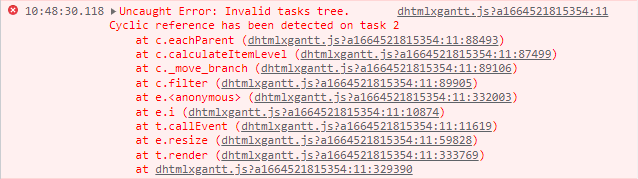
For example, this error may occur in the following cases:
- If ID of the task's parent is the same as ID of the task:
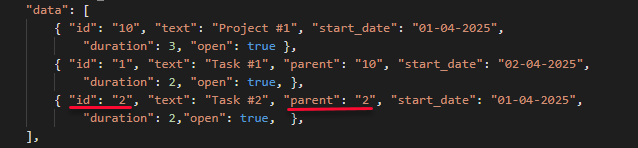
Task #2 cannot be a parent for itself.
- If one of the children of the task becomes its parent:
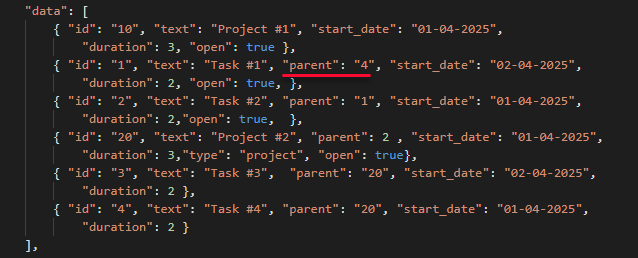
"Task #4" is specified as a parent for "Task #1". But at the same time "Task #4" is also a child of "Task #1".
Evaluation period has expired
If you have installed a licensed PRO version of the Gantt chart but still see the messages that the evaluation period has expired, it means that there is the Trial version somewhere in your application. Only the trial version has the functionality to show the popup message about the expired trial period.
So remember to completely remove files of the trial package of the Gantt chart before installing the PRO version. For more information, read the Adding PRO Edition into Project section.
Tip: To check which file is connected, you can type gantt.license in the web console.